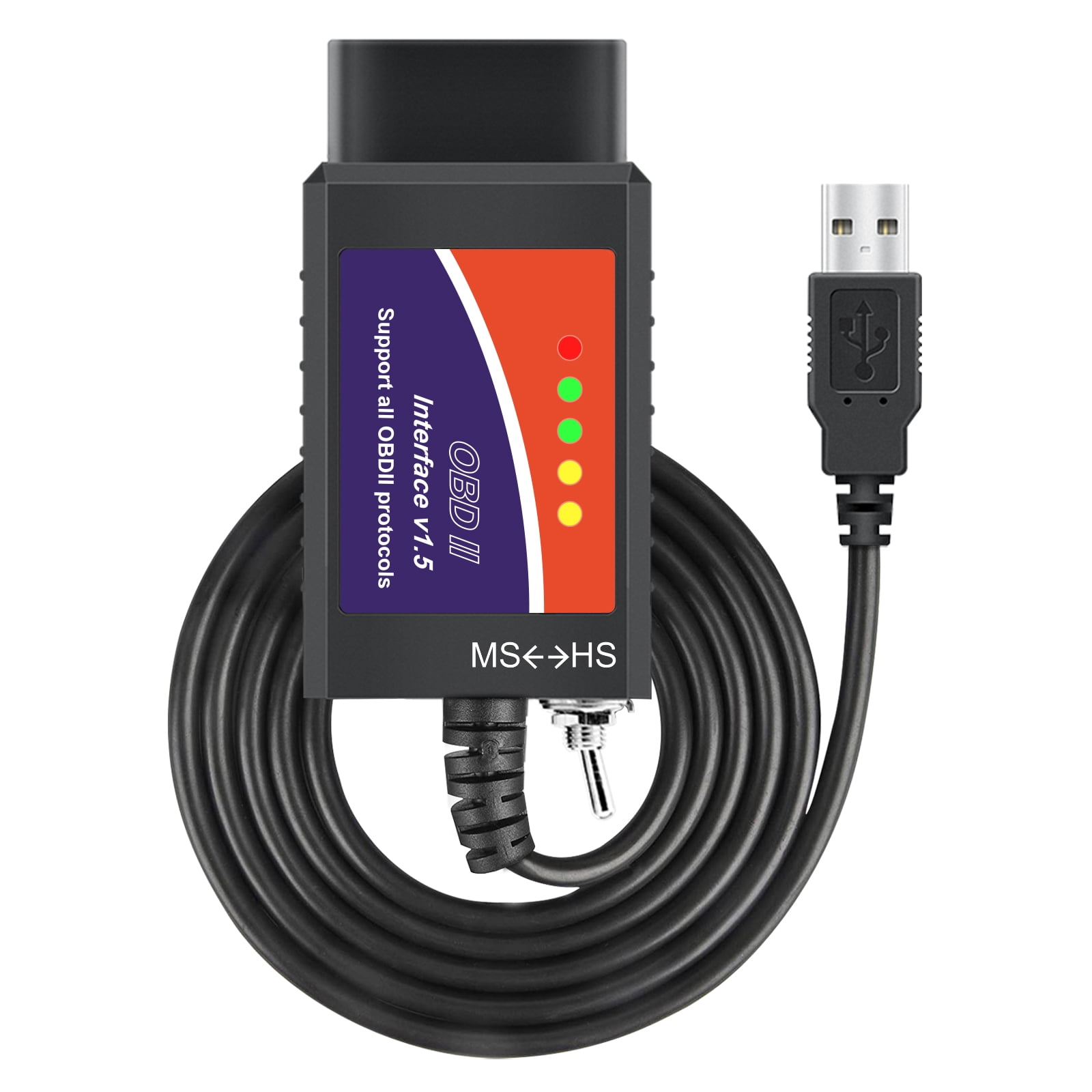
FORScan OBD2 USB Adapter for Windows, Car Diagnostic Coding Tool OBDII Auto Scanner with MS-CAN/HS-CAN Switch for Ford Lincoln Mazda Mercury Series Vehicles
Product details
| Management number | 251388853 | Release Date | 2026/09/26 | List Price | US$8.80 | Model Number | 251388853 | ||
|---|---|---|---|---|---|---|---|---|---|
| Category | |||||||||
<p>You need FORScan OBD2 Adapter. Easy to use scanner with USB connection, it’s the most practical adapter for basically any Ford produced since 1999* and also handy for Mazda, Lincoln and Mercury cars trucks and pickup and the OBD2 scan tool enables for easy, fast and reliable scanning and modification.</p> <p></p> <p>YOU CAN USE IT TO DO EVERYTHING WITH FORSCAN:</p> <p></p> <p>allows access to ALL electronic control units: engine, gearbox, ABS, Airbag, climate control, SRS, EPC etc.</p> <p></p> <p>Enable hidden features of Ford: Warning against forgetting the key,Warning not to fasten the belt,Warning over speed limit etc.</p> <p></p> <p>provides constant speed 500kbit/s</p> <p></p> <p>is compatible interface with MS-CAN / HS-CAN toggle switch</p> <p></p> <p>Code reading, erasing, live data</p> <p></p> <p>Allows all service procedures: Service reset, DFP force regeneration, etc</p> <p></p> <p>Allows component activation, ECU parameter modifications, etc</p> <p></p> <p>Install the drive</p> <p></p> <p>1. Download the CH340 USB driver</p> <p></p> <p>2. Unzip the USB drive installation package</p> <p></p> <p>3. Install the USB drive</p> <p></p> <p>4.plug device into usb</p> <p></p> <p>5.let windows configurate it</p> <p></p> <p>Download software</p> <p></p> <p>1. Download, install and run the forscan software</p> <p></p> <p>2. Open the forscan software and confirm the settings</p> <p></p> <p>3. plug the device into the OBD2 port</p> <p></p> <p>4. set the switch to HS-CAN</p> <p></p> <p>5. Start the engine and press connect</p> <p></p> <p>HIDDEN FUNCTION</p> <p></p> <p>Disabled the annoying double honk if you leave the truck and close the driver door with the engine running.</p> <p></p> <p>Enabled Quick Boot - Disables the "FORD" logo from showing up on the 8"display during start-up. This speeds up the boot process so your menus/normal display shows up in seconds.</p> <p></p> <p>Disabled the annoying chimes during start-up.</p> <p></p> <p>Changed the Panic mode to 2 presses of the Panic Button on the FOB to prevent accidental actuation.</p> <p></p> <p>Change the Panic mode to flash parking lights only, no horn beep.</p> <p></p> <p>Changed the turn signal lane change from 3 flashes to 5.</p> <p></p> <p>Added engine and transmission temperature digital displays above gauge displays on the cluster display.</p> <p></p> <p>Autofold Mirrors - Regular or Lincoln style are available</p> <p></p> <p>Reverse Mirrors - The outside mirrors tip down lower in Reverse so you can see the ground better while backing up.</p> <p></p> <p>Change the fog lamps so they will stay on during high beam.</p> <p></p> <p>Add heated/cooled seats and heated steering wheel buttons to the Home screen on the 8" display.</p> <p></p> <p>Enable Secure Idle - This prevents the shifter from being able to be moved out of Park</p>
FORScan OBD2 USB Adapter for Windows, Car Diagnostic Coding Tool OBDII Auto Scanner with MS-CAN/HS-CAN Switch for Ford Lincoln Mazda Mercury Series Vehicles| Automotive diagnostic tool type | Factory Scan Tools |
|---|---|
| Brand | OBDMONSTER |
| Compatible cars | Ford |
| Vehicle fitment type | Specific |
| Vehicle type | Car |
| Vehicle make | Ford |
| Vehicle year | 1999 |
| Features | Code Reader |
| Model | FORScan OBD2 USB Adapter |
| Items included | OBD2 USB Adapter |
| Has written warranty | No |
| Series | FORScan |
| Power type | Corded Electric |
| Extra battery included | N |
| Batteries incl | Y |
| Weight | 0.24 lb |
| Color | Multicolor |
Bestseller ranking
Code Readers and Scan Tools

Correction of product information
If you notice any omissions or errors in the product information on this page, please use the correction request form below.
Correction Request Form